







The .tf registry AFNIC performs checks on the WHOIS data of .tf domains. When they suspect that a .tf domain contains incorrect WHOIS data, they send an email to the email address listed in the registrant details requesting verification of the information.
Note: If you have received a message about verifying your registrant details, please do so within 7 days to avoid suspension. If you do not do this in time, the registry will suspend your domain name. After these 7 days, you will have an additional 30 days before the registry irrevocably cancels the domain name.
In this article, we explain how to check your details and what to do if verification of your information is required.
What can I do if my .tf domain has been selected for verification?
You will receive an email from the registry at the registrant’s email address informing you to verify your registrant details. The registry will notify us of this, after which we will send a message to the TransIP account in which the domain name is active.
You will then have 7 days to complete the verification. To do so, submit the correct details to our support department via your control panel. With your permission, they will forward the details to the registry so they can verify your information.
For individuals:
- Copy of ID
- Proof of address, not older than 3 months. This can be, for example, a utility bill (phone/internet/water/gas/electricity) showing your name and address.
For companies:
- Chamber of Commerce extract, not older than 3 months.
- Copy of ID of a person authorized to sign on behalf of the company.
In both cases also:
- A manually signed document (with pen) by the person on the ID copy, explicitly granting permission to forward the ID copy and personal data to our .tf registration partner Key Systems GmbH and the French registry AFNIC, for the purpose of verifying the registrant details of your domain name in accordance with the rules of the French registry.
Een handmatig met pen ondertekend document van de persoon van de kopie
During these 7 days, you can still correct the registrant details if they are incorrect. If the verification is not completed within 7 days, the registry will suspend the domain. After that, it will no longer be possible to correct the registrant details.
After these 7 days, you will have an additional 30 days to complete the verification and reactivate your domain. If you do not complete this within these 30 days (a total of 37 days), the domain will be immediately and irrevocably cancelled by the registry.
How do I check my current registrant details?
To do this, go to 'Domain' in your control panel and select the relevant domain in the left column (do not tick the checkbox). Then click the gear icon next to 'Your domain contact information' to directly view the WHOIS data of your domain name.
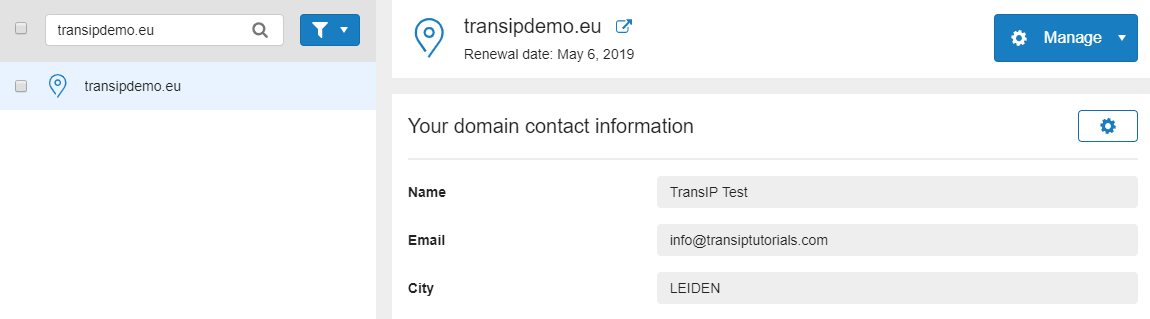
Check the details and correct them where necessary. For .tf domains, you can update the registrant details free of charge.
In the article Changing the registrant (owner) of your domain name, you can find more information about updating your WHOIS data.