







For the registration or transfer of .it domain names extra information is required in addition to the standard information. The additional information that Registro.it (the registry for .it domains) requires is:
- Country, in case the registrant is a company
- Codice Fiscale
- Registrant (owner)
- Identification number
- VAT number, in case the registrant is a company
The screen for the additional information looks like this:
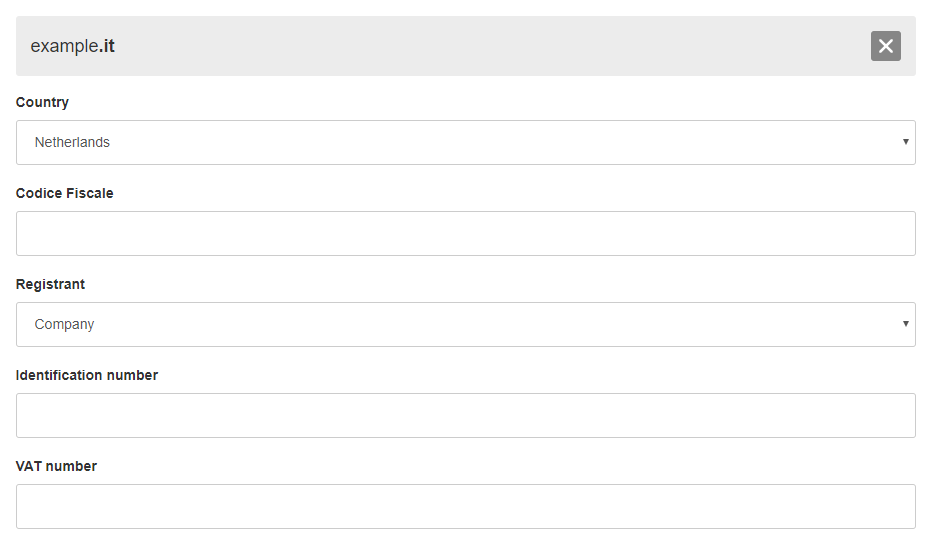
We further explain this information below:
Country
Select the country that the company you are registering the domain name for is located, if the registrant is a company. This is necessary for the successful validation of your VAT number, codice fiscale and identification number.
Codice Fiscale
If you have entered a company or person from Italy as registrant, it is important that you enter the codice fiscale of this company or person. This is a number of 16 characters that every Italian company or person has. If you have entered a registrant outside of Italy you can leave this field empty.
Registrant
Select whether the registrant (owner) of the domain name is a natural person or a company. It is important that this matches what you have entered at the regular registrant information.
Identification number
Enter the passport number if you selected a person as registrant. Enter the company's Chamber of Commerce registration number if you selected a company as registrant.
VAT number
Enter the VAT number of the company you are registering the domain name for, if you have entered a company as registrant. If you have entered a natural person as registrant, you can leave this field empty.