







It may happen that your .COM, .NET, or other generic Top Level Domain (gTLD), or country code Top Level Domain (ccTLD) domain suddenly becomes unreachable, even though you haven't made any changes to your domain name or website.
In most cases this means the email address of the registrant of your domain name was not verified on time, resulting in your domain name receiving the clientHold status. In this article you will learn more about email verification of your domain, why this may cause your domain name to become unavailable and, of course, how to fix this.
If you are using a .NL, .BE or .EU domain and it is unreachable, then email verification does not apply and the unreachable status of your domain has a different cause. In that case, please contact our support team, they will look into it for you.
Email verification for gTLD and ccTLD domains.
For generic Top Level Domains (gTLDs) and country code Top Level Domains (ccTLD), it is required to verify the email address that is listed in the domain name's registrant information.
The term gTLD consists of all domain names that do not end in a country code (such as .CO.UK, .EU and .NL). ccTLD consists of all domain names that do end in a country code. The registrant information is part of WHOIS and contains the contact information of the domain name's owner.
The exception to this are .NL, .BE and .EU domains. For these domains there is no email verification.
The email verification was added by ICANN, with the purpose of validating email addresses and reducing the amount of malicious and spam email addresses currently being used.
The email verification has to be performed only once per email address and starts the moment you use the email address in a domain name's registrant information for the first time. This means the email verification could start when you register a domain name, but also when changing the registrant information.
It's important that the email address is verified within 14 days after the email verification started. If you fail to do so, all gTLDs and ccTLDs using that email address in it's registrant information will be temporarily suspended.
We will now explain how to check if email verification is required for your domain name.
Recognizing email verification
You're probably reading this article bacause your gTLD suddenly became unavailable. You may have noticed this because your website shows an error page stating the server's IP address cannot be found. It's also possible your domain name displays a notice that your domain name has been suspended.

If that's the case, it means you haven't responded to the email verification request in time. If the email verification started at TransIP, you will receive an email from support@transip.nl with the subject 'Email verification'. (If you have the Whitelabel service, a different e-mail adress is used: support@www.ns0.nl.)
This email will be sent a few times. Once at the start of the verification process and again every few days. If you click the link inside one of these emails, the verification of your email address will be instantly completed.
If you received the mail from noreply@transip.nl, it will look like this:
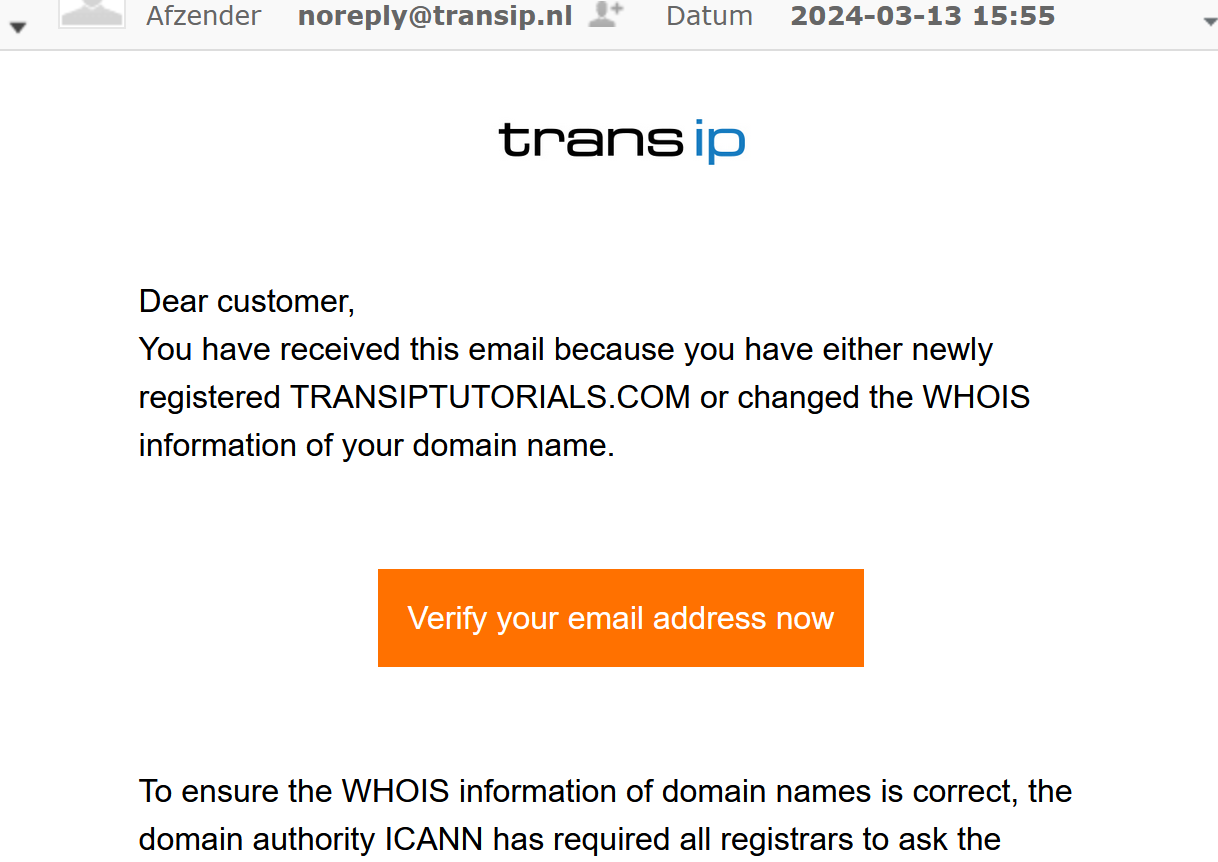
Hover your cursor over the button to check where it leads; https://service.controlpanel.pro.
A notification will also be present inside your control panel. To check if email verification is required, log on to your control panel and head to 'Domain'. Next, select your domain name on the left hand side (don't check the box).
If the notice below is shown, search for the verification email sent to the email address listed in the notice. As mentioned before, this email was sent by support@transip.nl or noreply@transip.nl and has the subject 'Email verification'. (If you have the Whitelabel service, the e-mail was sent from support@www.ns0.nl and has the same subject.)

I have not received a verification email
If you have not received the email or can no longer find it, first check via WHOIS which registrar is the overarching registrar of your domain name:
- If you see ‘Key-Systems GmbH’ next to Registrar, contact our support department. They can have the verification email sent to you again.
If the email address in the registrant details is not accessible, you will not be able to receive or confirm this email. Therefore, change the email address in your registrant details via your control panel to an email address where you can receive the email. To do this, follow the steps in the article ‘Changing the registrant details of your domain name’.
- If you see ‘REGISTER S.P.A.’ next to Registrar, you can have the email sent again yourself via the suspension page on your domain name.
If the email address in the registrant details is not accessible, you will not be able to receive or confirm the email, and therefore you will not be able to change your registrant details yourself. In this case, a manual registrant change is required.
Are you still unable to receive the verification email after following these steps? Then contact our support department.
Note:
- Changing the registrant details of a gTLD also means that the domain cannot be transferred for 60 days after the change. The previous email address of the registrant will also be notified of this by email. This email is sent from noreply@emailverification.info or noreply@transip.nl.
This 60-day restriction was also introduced by ICANN.
- Many ccTLD domains have a different procedure for changing registrant details. The steps and any associated costs are explained in the Knowledgebase.
- If you enter an email address that has already been verified, it does not need to be verified again. Your domain name will become reachable again almost immediately.
Also, do not use an email address that ends with a domain name that has been suspended due to a failed email verification. This email address is, just like the website, not reachable.